Lesson 7: Parallelism and Errors
uberjob.run() uses multithreading to run the given Plan in parallel.
Its behavior is nuanced when errors occur.
By default, the thread count is based on the core count; it can be explicitly specified using the max_workers argument.
Also by default, calls stop being scheduled if an error occurs, but a number of them may already be in flight.
The max_errors argument can be used to keep scheduling calls until the given error limit has been exceeded.
Furthermore, the retry argument can be used to attempt each call multiple times before raising an error.
When an error occurs, run() waits until there are no calls in flight and either no calls remain or the error limit has been exceeded.
Once this condition has been met, the first error is raised.
A consequence of this is that for certain workloads, the first error can occur long before run() finishes.
The silver lining is that failures are seen immediately by progress observers.
The Jupyter Notebook, HTML, and console progress observers all display the number of failures for each scope.
Additionally, the Jupyter Notebook and HTML versions organize the exceptions in a collapsible structure, and the console version prints each exception once.
These features are especially useful during development.
Example
The following code runs an error-prone function thousands of times, ensuring many errors.
>>> import random
>>> import time
>>> import uberjob
>>>
>>> def dont_roll_six():
...     time.sleep(random.random() * 10)
...     if random.randint(1, 6) == 6:
...         raise Exception('Something bad happened.')
...
>>> plan = uberjob.Plan()
>>> calls = [plan.call(dont_roll_six) for _ in range(10000)]
>>> uberjob.run(plan, output=calls, max_workers=32)
The progress widget captured partially through the run is displayed below. At this point, 6 calls to the function have succeeded, 3 failed, and 23 are still in progress. And the exceptions can be individually viewed.
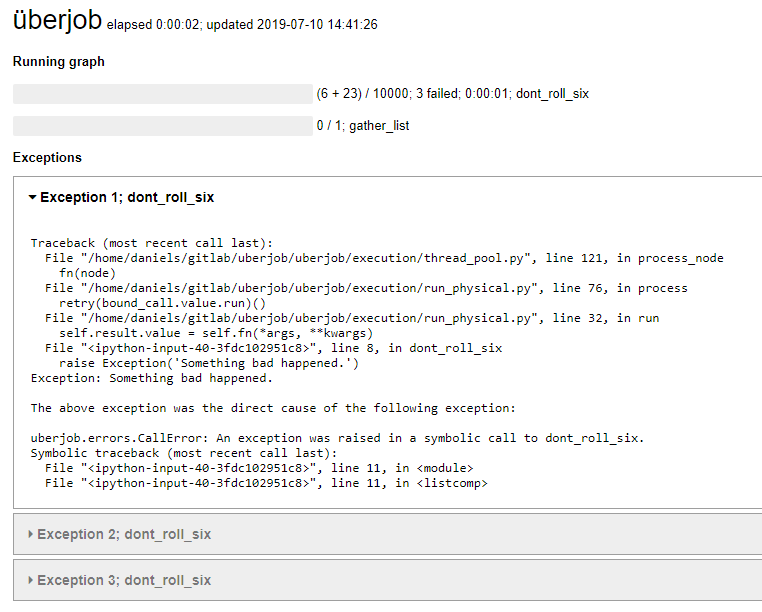
The progress widget also provides imprecise profiling by allocating elapsing time uniformly among all running calls. The elapsed time attributed to a scope is displayed only if it’s at least one second.