Lesson 2: The Registry
The Registry is a mapping from nodes in a Plan to value stores.
Value stores are instances of ValueStore, and represent how and where nodes are stored.
When a Registry is provided when running a Plan, uberjob automatically reuses stored values which are up to date and rebuilds those that are not.
The Registry maintains two kind of relationships: stored and sourced. These are presented in the following examples.
Example 1
This example introduces the stored relationship.
Nodes can be stored using add().
This example uses JsonFileStore, an implementation of ValueStore.
uberjob.run() and uberjob.render() both accept a Registry as a keyword argument, and it must be passed to take effect.
Additionally, run() will do what’s necessary to update stale value stores in addition to computing the requested output.
>>> import operator
>>> import uberjob
>>> from uberjob.stores import JsonFileStore
>>>
>>> def area(width, height):
...     return width * height
...
>>> plan = uberjob.Plan()
>>> registry = uberjob.Registry()
>>>
>>> x = plan.call(operator.add, 1, 2)
>>> registry.add(x, JsonFileStore('x.json'))
>>>
>>> y = plan.call(operator.add, 3, 4)
>>> registry.add(y, JsonFileStore('y.json'))
>>>
>>> z = plan.call(area, width=x, height=y)
>>> registry.add(z, JsonFileStore('z.json'))
>>>
>>> uberjob.render(plan, registry=registry)
It can be helpful to visualize how the Registry affects the Plan that actually gets executed, which is called the physical plan.
run() can be passed dry_run=True to return the physical plan instead of running it; the physical plan can then be passed into render().
Notice that stored values are written and then read back before using them downstream. One of the reasons for this is to ensure that any side effects caused by the value store’s write-read cycle are observed consistently regardless of whether the stored value is stale or not.
>>> uberjob.render(uberjob.run(plan, registry=registry, dry_run=True))
Now actually run the Plan. This will generate the JSON files specified by the value stores.
>>> uberjob.run(plan, registry=registry)
The run() call above also displays the following progress widget, which has two stages now that a
Registry has been provided. Also, the calls to uberjob.ValueStore.read and
uberjob.ValueStore.write appear ‘nested’ under the other functions. The progress bar labels are
displaying tuples called scopes, which are covered in a later lesson.
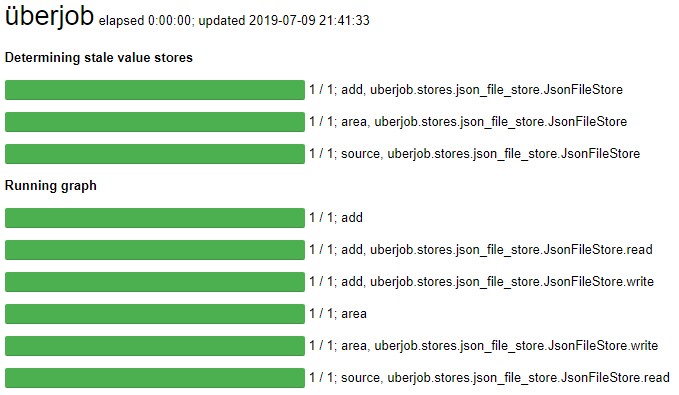
If the same run command is executed again, nothing will run because the value stores are all up to date and no output has been requested. If z is requested as output, it will be read from its value store instead of being recomputed. This is easily confirmed by rendering the physical plan.
>>> uberjob.run(plan, registry=registry)
21
>>> uberjob.render(uberjob.run(plan, registry=registry, output=z, dry_run=True))
uberjob uses uberjob.ValueStore.get_modified_time() to determine what is stale. The convention is to return None when the stored value is missing entirely.
Manually delete x.json and then render the physical plan again. Note that x and z will get recomputed but y will not.
>>> ! rm x.json
>>> uberjob.render(uberjob.run(plan, registry=registry, dry_run=True))
Example 2
This example introduces the sourced relationship.
While the concept is more general than this, the relationship can be thought of as a way to handle input files.
The value of a sourced node can only be obtained by reading from its value store.
Nodes are sourced using source().
In this example, suppose that x.json already exists as an input file. Note that the sourced node is a call to a placeholder function called source, which raises an exception if called directly.
>>> ! rm y.json z.json  # Ensure that outputs from the previous example are deleted.
>>> ! echo 3 > x.json
>>>
>>> import operator
>>> import uberjob
>>> from uberjob.stores import JsonFileStore
>>>
>>> def area(width, height):
...     return width * height
...
>>> plan = uberjob.Plan()
>>> registry = uberjob.Registry()
>>>
>>> x = registry.source(plan, JsonFileStore('x.json'))
>>>
>>> y = plan.call(operator.add, 3, 4)
>>> registry.add(y, JsonFileStore('y.json'))
>>>
>>> z = plan.call(area, width=x, height=y)
>>> registry.add(z, JsonFileStore('z.json'))
>>>
>>> uberjob.render(plan, registry=registry)
The physical plan can be rendered to confirm that the source placeholder will be replaced.
>>> uberjob.render(uberjob.run(plan, registry=registry, dry_run=True))
Now actually run the Plan. This will generate the JSON files specified by the value stores. Note that z is requested as output here only to compare to a different output later. The files will be updated even if no output is requested.
>>> uberjob.run(plan, registry=registry, output=z)
21
Next, change x.json and then render the physical plan again. Note that z will get recomputed by y will not.
>>> ! echo 5 > x.json
>>> uberjob.render(uberjob.run(plan, registry=registry, dry_run=True))
Finally, run the Plan again to observe the updated output.
>>> uberjob.run(plan, registry=registry, output=z)
35
Example 3
The Registry also provides the standard read-only mapping methods.
>>> ! echo 7 > w.json
>>>
>>> import uberjob
>>> from uberjob.stores import JsonFileStore
>>> plan = uberjob.Plan()
>>> registry = uberjob.Registry()
>>>
>>> w = registry.source(plan, JsonFileStore('w.json'))
>>> v = plan.call(pow, 2, 8)
>>>
>>> w in registry
True
>>> v in registry
False
>>>
>>> w_value_store = registry[w]
>>> type(w_value_store)
uberjob.stores.json_file_store.JsonFileStore
>>> w_value_store.read()
7
>>>
>>> registry.values()
[JsonFileStore('w.json')]