Lesson 6: Scopes
Every Node in a Plan has a scope property, which is a tuple used for organizational purposes.
Scopes are used to group calls when displaying progress bars, and also when using uberjob.render() if the level argument is provided.
Call nodes have their fully-qualified function name implicitly appended to their scope.
When a Registry is applied to a Plan, the added calls inherit the scope of the node they are replacing.
The context manager uberjob.Plan.scope() can be used further organize a Plan.
Example
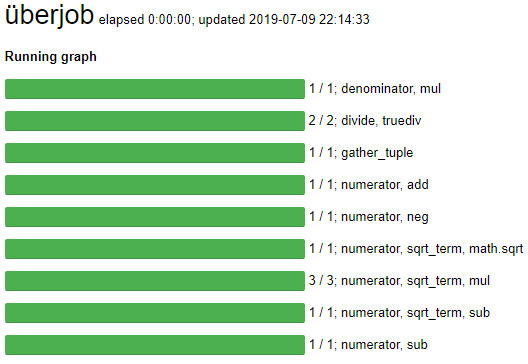
The following code solves a quadratic equation using only symbolic calls. Scopes are used to organize the steps.
>>> import math
>>> import operator
>>> import uberjob
>>>
>>> def solve_quadratic_equation(plan, a, b, c):
...     with plan.scope('numerator'):
...         minus_b = plan.call(operator.neg, b)
...         with plan.scope('sqrt_term'):
...             bb = plan.call(operator.mul, b, b)
...             ac = plan.call(operator.mul, a, c)
...             four_ac = plan.call(operator.mul, 4, ac)
...             sqrt_term = plan.call(math.sqrt, plan.call(operator.sub, bb, four_ac))
...         numerator_plus = plan.call(operator.add, minus_b, sqrt_term)
...         numerator_minus = plan.call(operator.sub, minus_b, sqrt_term)
...     with plan.scope('denominator'):
...         denominator = plan.call(operator.mul, 2, a)
...     with plan.scope('divide'):
...         root_plus = plan.call(operator.truediv, numerator_plus, denominator)
...         root_minus = plan.call(operator.truediv, numerator_minus, denominator)
...     return root_plus, root_minus
...
>>> plan = uberjob.Plan()
>>> roots = solve_quadratic_equation(plan, 5, 6, 1)
>>> uberjob.run(plan, output=roots)
(-0.2, -1.0)
The scopes are visible in the progress widget.
The full render is perplexing.
uberjob.render(plan)
It can be simplified by passing the level argument.
uberjob.render(plan, level=2)